To ensure financial accuracy and prevent retroactive changes to historical data, it is critical to manage tax rate transitions correctly within the system.
When a tax rate changes (e.g., from 2026 to 2027), never edit an existing tax record. Instead, you must expire the old tax and create a new one.
Why You Should Not Edit Existing Rates
Modifying the percentage of an existing tax record triggers a "global update" across the database. This means:
-
Historical Accuracy: Past reservations and completed stays will have their tax calculations retroactively changed, leading to accounting discrepancies.
-
Reporting Errors: Your year-end financial reports will no longer match the actual revenue collected.
-
Invoicing Issues: Any re-printed invoices for past bookings will show the incorrect current rate rather than the rate that was legally applicable at the time.
Tax Rate Transition Steps
Expire the Current Tax
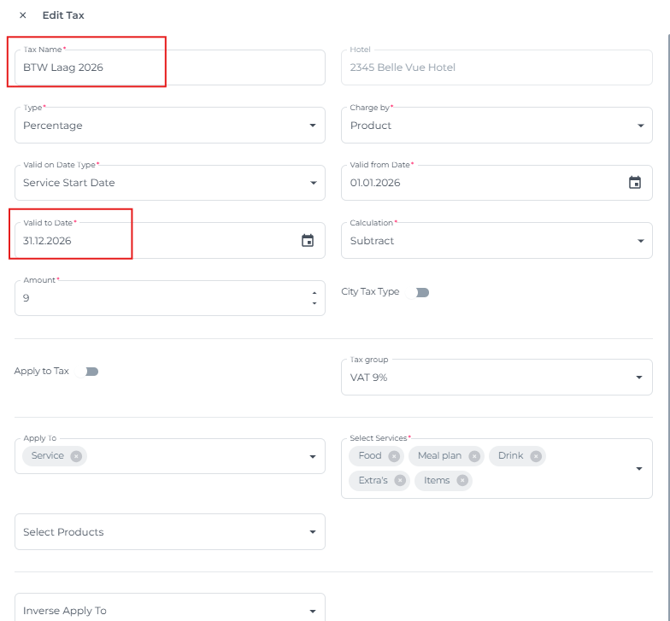
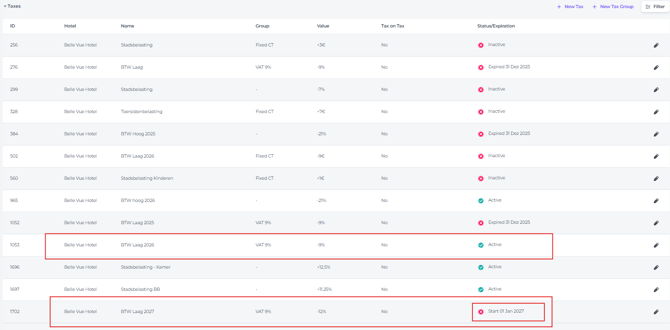
Locate the tax rate that is valid for the current calendar year and set a definitive End Date.
Example: If the 9% Low VAT rate is changing at the end of 2026, set the expiration date to 31.12.2026.
Create the New Tax Record
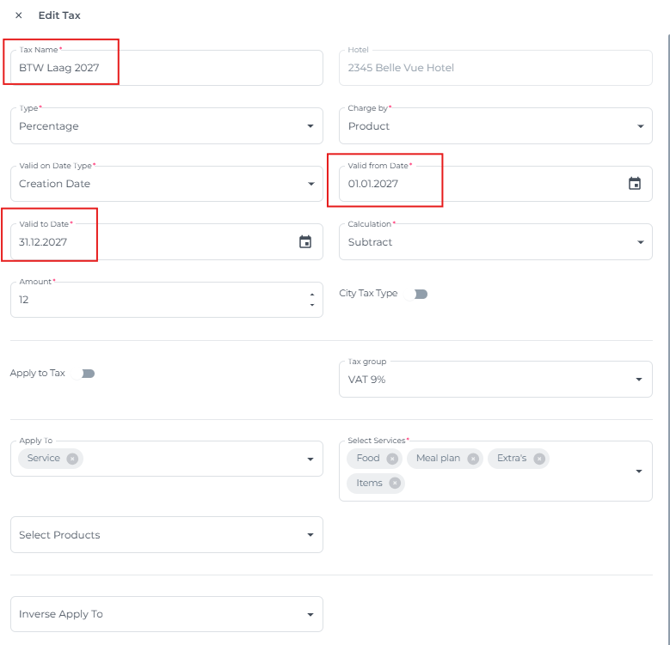
Create a completely new tax entry for the upcoming calendar year. This ensures the system treats it as a unique entity which will start on the date you will configure.
-
Tax Name: Use a descriptive name (e.g., "Low VAT - 2027").
-
Effective Start Date: Set this to 01.01.2027.
-
Effective End Date: Since future tax laws can be unpredictable, set this to 31.12.2027 or further into the future if the rate is expected to remain stable.
-
Status: Make sure the status is set to active so that all bookings from the next calendar year are assigned the correct tax rate.
Summary Checklist
-
Do Not Edit: Leave the current tax rate record untouched (other than setting the end date).
-
Set Expiration: Ensure the current tax ends exactly one day before the new one begins.
-
New Entry: Create the new tax rate as a fresh line item.
-
Verify: Check that upcoming bookings for the new year are pulling the new rate while bookings for current year remain at the original tax rate.