By default, the occupied room status is automatically set to “dirty” only after check-out. To update the room status to reflect its actual current condition, it must be changed manually via the room calendar.
💡See article How to Manually Change the Housekeeping Status of a Room
If you want all occupied rooms to be set to “dirty” at the start of each day, you can easily configure this in your Hotel Settings. This ensures Housekeeping starts with a clear overview and can determine the required type of service using the Housekeeping Report.
-
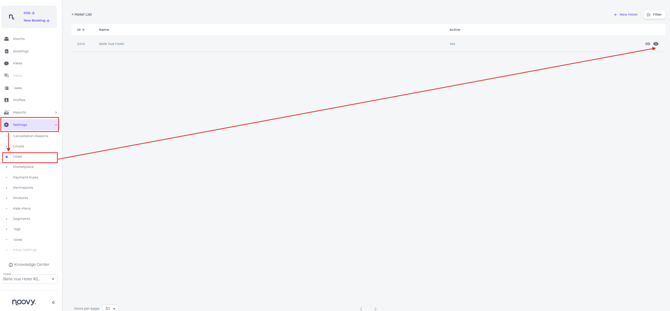
To activate the 'Dirty Status After Midnight' go to Settings from Main Menu:
- Click on the eye Icon to open the Settings:
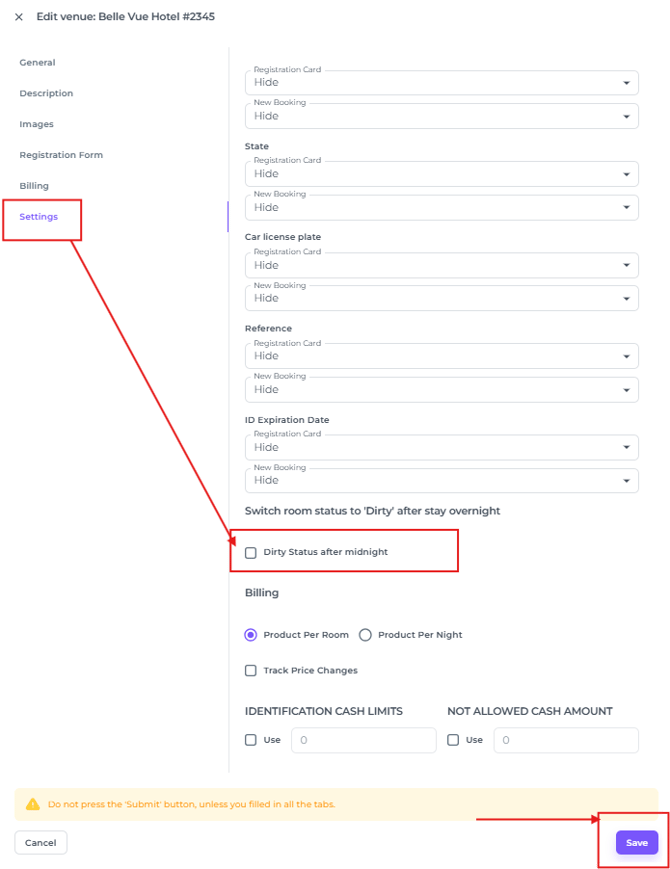
- In the Hotel Settings menu choose Settings and scroll down to 'Dirty Status after Midnight'
- Tick the box and hit Save:
All occupied rooms will now be set to “dirty” at the start of the day, providing a clear and easy-to-manage overview for your team.