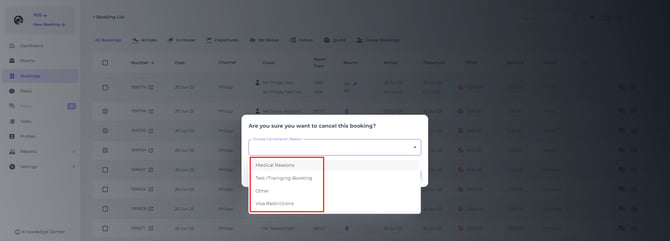
The system allows you to define specific reasons for cancellations, which helps you gather crucial data on why bookings have been cancelled. This is invaluable for understanding trends, improving services, and refining your marketing strategies.
By standardising cancellation reasons, you ensure that all team members record information in a consistent way, making reports clear and comparable over time. You can, for example, distinguish between price‑driven cancellations, date changes, external factors (such as travel disruptions), or service‑related issues. This insight helps you to:
-
Identify patterns (e.g. frequent cancellations from a specific channel, rate plan, or room type).
-
Adjust pricing, policies, and availability where needed (for instance, relaxing conditions on high‑cancellation channels).
-
Improve guest communication by proactively addressing common concerns.
-
Share concrete data with your team, owners, or revenue manager to support decisions instead of relying on assumptions.
In short, well‑configured cancellation reasons turn every cancelled booking into a learning opportunity that supports better forecasting, stronger sales strategies, and a more resilient operation.
Follow the steps below in order to set up your custom cancellation reasons:
-
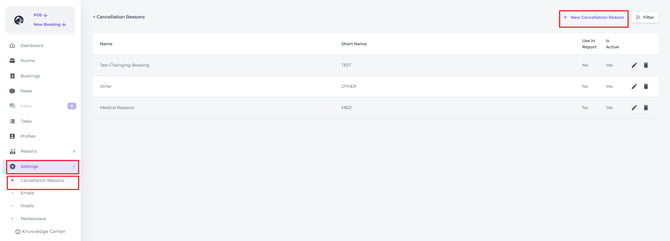
From the main menu, click on Settings > Cancellation Reasons.
-
To create a new reason, click on + New Cancellation Reason.
-
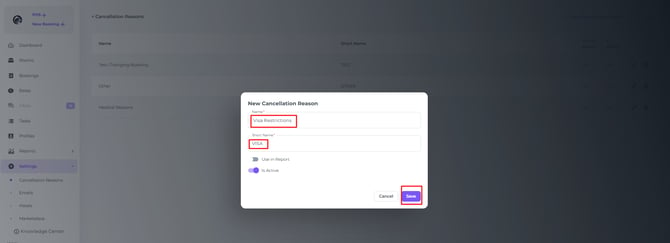
Fill in the custom name for the cancellation reason (e.g., "Guest changed plans," "Found better rate," "Travel restrictions").
-
Enter a short name for quick identification (e.g., "GCP," "FBR," "TR").
-
Finally, click on Save to apply your changes.
Result👉
Once you've set up your cancellation reasons, Noovy will prompt you to select a reason every time a booking is cancelled.