Checked-out bookings should not have any open proformas unless there is a specific reason to keep them open. Proformas are temporary billing documents and should normally be converted into invoices at check-out. Review any remaining proformas for past bookings, finalise those that are ready to be invoiced and cancel any that are no longer needed.
When you check out a guest, Noovy will ask: 'Would you like to finalise the proformas of the booking?' Clicking Yes will convert all proformas in that booking into invoices. In some cases, there may be a specific reason not to finalise a proforma yet, but in most cases you'll want it to be converted into an invoice at check-out.
Billing Documents Report
Use the Billing Documents Report to find any active proformas for passed/checked-out/cancelled bookings that still need to be finalised into invoices. Follow these steps:
- Main Menu > Reports > Billing Documents
- Click Filter and select the following if you are looking for Proformas in stayed bookings:
- Type > Proforma
- Status > Active
- Check-out > Enter the period you would like to check, for example previous month
The report will show all active proformas for bookings with a check-out date in the selected period. Review each proforma to decide whether it should be finalised into an invoice or cancelled. (Open the booking by clicking on the square at the booking number to take appropriate actions)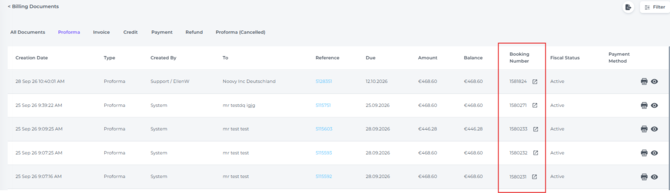
You can also use the filters to find proformas for no-show or cancelled bookings, or proformas with a specific amount.