Processing a guest’s credit card using the card on record is straightforward within your property management system, regardless of whether the cardholder is present.
For non-refundable bookings, late cancellations, or no-shows, you can securely charge the card via the Stripe Payment Gateway. The guest has authorised the charge by completing their booking online and agreeing to the terms and conditions, or by accepting the payment policy included in their confirmation email (for manual bookings).
To charge a credit card, please follow the steps below:
- Open the reservation (see article: "'How to find a booking'")
- Navigate to the Billing section on the booking page:
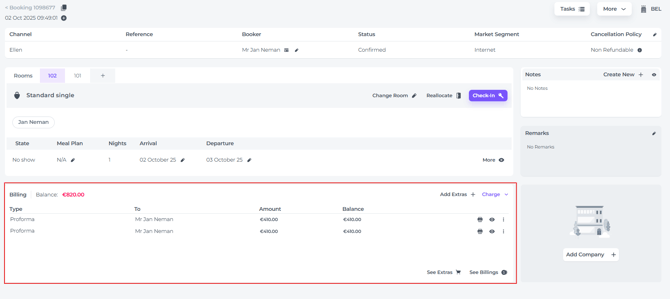
- Click on the Charge button:
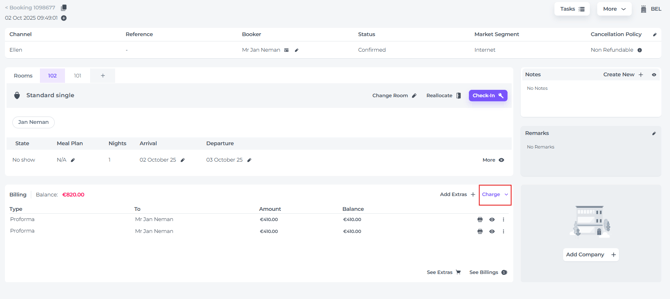
- In the dropdown menu, select Payment Gateway:

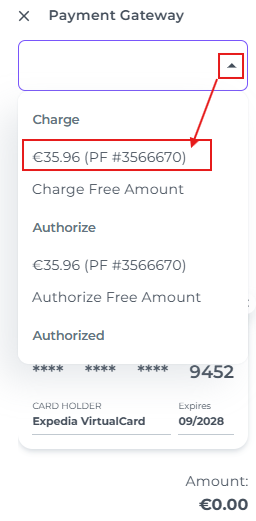
- Open the drop-down menu and select Charge, choose the applicable amount. If several Proformas are outstanding, select the specific one you wish to charge:
- Click the Charge button to process the payment:
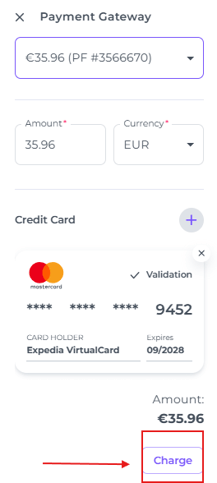
- The system will charge the correct amount to the card saved against the booking and will notify you once the payment has been successful via a notification.
📝 Note:
Charging the booking will automatically generate a payment document in the billing section. Should the transaction fail, a message will explain why (e.g. insufficient funds on the guest's card), so that you can address the issue straight away.