ℹ️ Credit card Authorisations from start to finish:
The Authorisation
Many hotels place an authorisation hold on the guest’s credit card at check-in to cover potential incidental charges and ensure payments are collected smoothly. When there is no action afterwards, the authorised amount on a credit card will automatically be released within 30 days.
Cancel an Authorisation
You can cancel the authorisation after departure, which will release the amount sooner back to the guest's bank account (7 - 10 days) . A specific timeline when the amount will be back on the account depends on the efficiency of their bank. Please advise the guest to contact their bank if the delay is longer than that.
👉 See article 'How to Cancel (release) Credit Card Authorisation'
Capture an Authorisation
Another option is to 'capture' the authorisation at check out, if the guest agrees. This means that the authorisation is converted into an actual payment. Any left to pay charges that remains afterwards can be settled by the guest using their preferred payment method.
*By choosing to capture the authorisation at check-out, you streamline the payment process and prevent delays in returning funds to the guest’s account—helping to ensure a positive experience. ☝️Mind you: It’s essential to confirm the guest’s consent before proceeding, which can be documented with a signature on the printed invoice to provide clear authorisation for the charges. If a dispute is raised after check-out, this documentation will serve as important evidence.
👉 Check out the article: 'How to capture a Credit Card Authorisation'
💳Credit Cards On File
Credit card details provided by guests at the time of reservation at an OTA will automatically be linked to their booking.
Authorisations and payments are processed securely through Stripe, provided your hotel’s Stripe account is connected to your PMS.
☎️If your Stripe account has not been set up yet, please contact Noovy Support or your Noovy Account Manager for assistance.
Follow the below steps to easily authorise the credit card on file;
- Go to the reservation applicable (See article 'How to find a booking' if you doubt how to easily find the concerning booking).
- Open the Booking page of the reservation you would like to create an authorisation for.
- Check if there is a Credit Card attached to the booking (credit card icon), this is generally the case when the booking is created via an online platform:
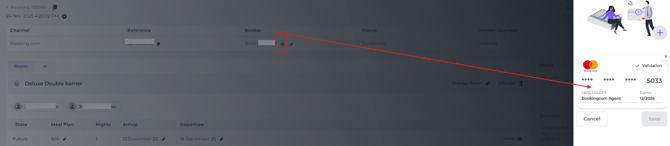
*If no credit card is currently linked to the booking—such as when a reservation is manually created by you or a team member—you can add the guest’s or booker’s credit card details once they provide them. Simply click the credit card icon with a + to enter the information: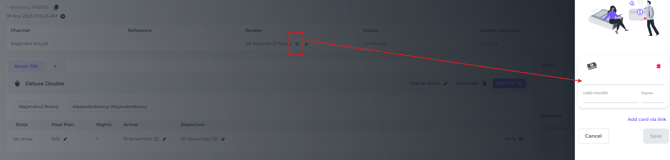
⚠️Important Note:
Always obtain written confirmation from the cardholder when credit card details are provided. Securing explicit consent to charge the credit card when necessary, ensures you are authorised to charge the card as needed, such as for cancellation fees or no-show charges, reducing the risk of future disputes.
- Click on Charge - Payment Gateway in the Billing Section of the booking page:
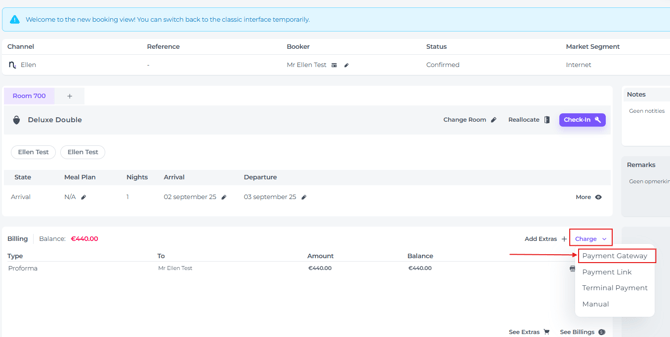
- In the appearing pop up screen click on the arrow under Payment Gateway, this will give you the options to Charge or Authorise the credit card.
- Click Authorise:
Click on the applicable option: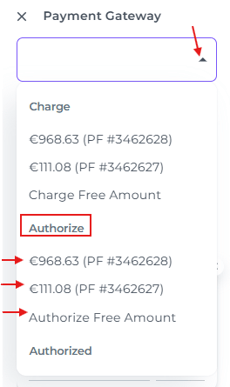
*You can select which Proforma you wish to authorise, or alternatively, specify a custom Free amount to authorise according to your preference. - The card will be authorised, generally blocking the amount authorised for 7 days (this might vary, depending on the cardholder's bank of choice).
📝Note:
If the card is not authorised due to insufficient funds or fraud card (amongst other) the system will show you the authorisation has failed and the reason applicable via a pop up message.