With Noovy Locks, you’ve already taken the first step towards seamless hotel automation. Your operations are now faster than ever.
A new access code will be generated and sent to the guest by email, based on the configured email template for this event.
The code will be valid from the arrival date and time until the departure date and time. It will grant access to the assigned hotel room, as well as any additional locks configured for the guest (such as the main entrance).
Issuing a new code will automatically override any previously generated code for that guest. It will not affect access codes for other guests or hotel staff.
Create the code in seconds:
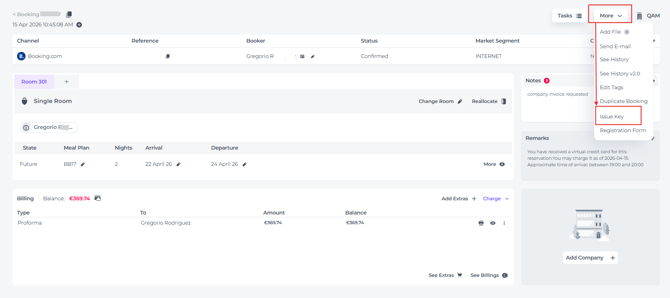
- Open the booking you wish to create a code for and click More - Issue Key:
- A pop-up will appear displaying the default check-in and check-out times, alongside the guest’s email address. You can amend these details to suit their schedule.
To provide a truly personal touch, use the message field to include a tailored note and ensure a warm, welcoming experience.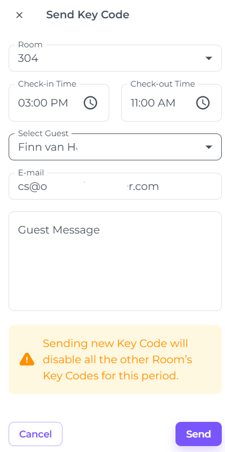
- Next: click Send and the personal access code is on its way and received in moments.