Noovy RMS helps hoteliers price their rooms intelligently and consistently—without needing to be a revenue management expert.
By combining real-time market data, competitor pricing, and your hotel’s own performance data, Noovy continuously calculates the optimal rate for every day.
Noovy RMS is more than just a pricing tool. It’s a fully integrated Revenue Management System built into Noovy, using everything your hotel already knows—plus live market insights—to help you maximize revenue effortlessly.
Recommended Rate
The Recommended Rate is your optimal price for a given day, updated four times per day.
The Recommended Rate is calculated using:
- Market data and competitor pricing
- Hotel occupancy and booking patterns
-
Noovy uses the principle of Optimal Occupancy. The hotel defines its ideal booking curve and target occupancy levels. Noovy then compares the actual occupancy and booking pace for each day with this optimal curve and adjusts the recommendation accordingly.
In short:
-
-
-
If your hotel is behind pace and needs more bookings, the recommended rate will be positioned towards the lower end of your competitors.
- If your hotel is ahead of pace and already has strong occupancy, the recommended rate will move towards the higher end.
-
The Recommended Rate is applied to one base room type and rate plan, which can be selected during setup. Other room types should be affected by the base room type.
Rate Calendar
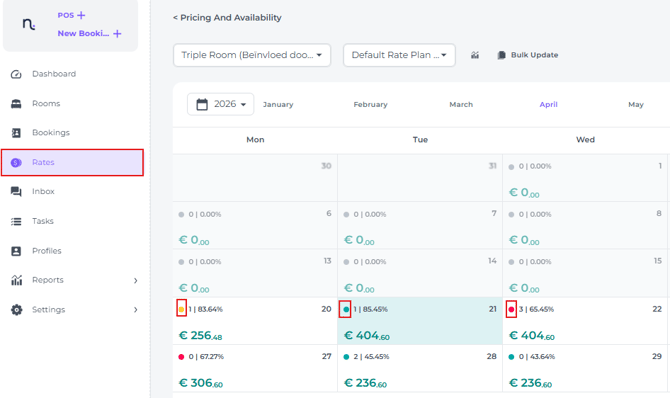
In the Rate Calendar, a colour indicator shows the difference between your current rate and the recommended rate:
- Green: less than 5% difference
- Yellow: 5% to 10% difference
- Red: more than 10% difference
-
When opening the Daily Statistics pop-up, the recommended rate is shown and can be applied directly.
-
The recommended rate can be applied:
-
Manually - We advise hoteliers to first apply recommendations manually and monitor the results.
-
Automatically - Once comfortable, auto-apply can be enabled. When auto-apply is active, rates can still be set manually for specific dates by locking the rate. Locked rates will not be overwritten.
-
When Noovy RMS Automatic Rate Update is enabled, but you want to disable it for specific periods, you can use Block Rate from Affection & Auto Update in the Bulk feature of the Rate Calendar:
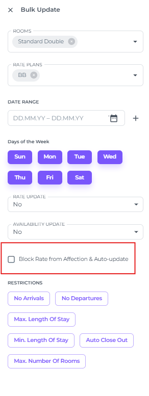
By selecting the checkbox and switching on the toggle, automatic rate updates are disabled for the selected period and rates in the Bulk Update. 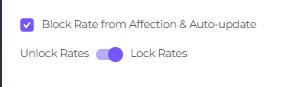
Control
The recommended rate is fully autonomous, but the hotelier can still influence it by changing the following:
-
Pricing Strategy via the Room Calendar (previously Rate Option)
-
Per day, the user can define the Pricing Strategy:
- Low – focus on occupancy
- Normal – balanced between occupancy and rate
- High – focus on higher rates
The pricing strategy affects how the hotel is positioned within its compset and the market.
A default strategy can be set in the RMS settings (recommended: Normal). This allows hoteliers to:
- focus on occupancy during low-demand periods (e.g. Sundays or January)
- focus on rate during high-demand periods (e.g. Saturdays or peak months)
For most days, the Normal strategy will result in the highest RevPAR.
Competitor Set
These are six competitors that will be tracked closely, and can be selected by the hotelier. The selected competitors will affect the recommendation.
Optimal Occupancy
The optimal occupancy can be set by the hotelier. Setting a higher target occupancy will result in lower rate recommendations, while setting a lower target occupancy will result in higher rate recommendations. The optimal occupancy can be set with full flexibility, setting the occupancy rate at a specific number of days prior to arrival, the dates in between are calculated linearly. This also allows the ability to change the rate position in specific periods, attracting more early bookers or last minute bookings.
Minimum Rate
The hotelier can set a minimum rate, the recommended rate will never be lower than what is set up here.
Mark-up
The user can set up a specific increase or decrease to be applied on the recommended rate. In case for example the user wished the recommended rate to always be €20 higher. This is particularly useful if the base room type is not the cheapest 2-person room type, in that case we advise to set the mark-up to the price difference between the cheapest 2- person room type and the base room type.
Last Minute Price Drop
You can not sell a room for a night that has already passed. To ensure no room goes unsold on the day, we have created the Last Minute Price Drop tool to help you secure those final bookings.
-
Users can decide exactly when and by how much the price should drop; this will only affect the rate for the same day. This allows hoteliers to increase their same day bookings and reduces empty rooms, boosting your occupancy. The Last Minute Price Drop can be set up independently of the recommended rate.
Reports & Insights
Noovy will not only recommend a rate, you can also get more insights and information on your hotel and market, using reports and tools such as:
Daily Statistic pop-up
Showing you the ADR, Occupancy and RevPAR of that day compared to the same day last year. It also shows you the rates of your competitors with the related room types, and you pick-up for that day in the last 1, 3, 7 and 14 days.
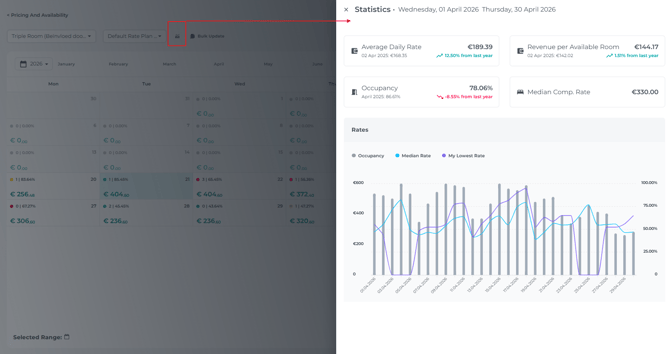
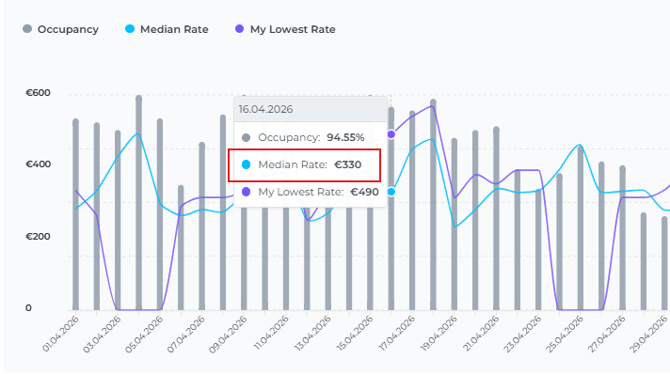
Monthly Statistic pop-up
Showing you the ADR, Occupancy and RevPAR of that month compared to the same month last year. It also shows you a graph with your occupancy, your lowest available rate and your competitor’s median.
On Books Report
Showing your current on-books situation per day and per segment.
Pick-up Report
Showing your pick-up for each day in the last 1, 3, 7, 14, 21 and 30 days.