What are Events in Noovy
Events are highlighted periods on calendars and in reports that indicate occurrences such as local festivities, concerts, national and global holidays, trade fairs, or other demand-driving activities in your area. By marking these dates as events, you can quickly see when atypical demand is expected, adjust your pricing and restrictions proactively, and later compare performance across similar events and years to refine your revenue and marketing strategy.
How Events are used in your Noovy platform is described in detail in the elaborate article The Event Feature Expained
This article focusses on how to create events to certain periods. Follow the easy steps below:
Where to create an Event:
📝Note:
Events are created per hotel. If your account includes multiple venues, you need to set up Events separately for each venue.
Creating an event can be done when:
-
Clicking on the Events Calendar icon in the Rate Calendar:
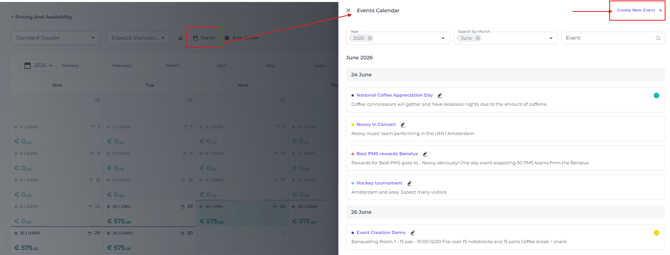
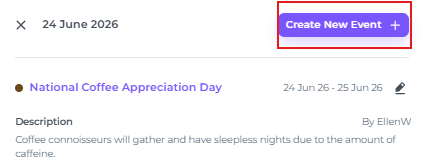
- Clicking on a day that already has events opens the detailed Event pop-up, where the + Create New Event option is available:
The steps:
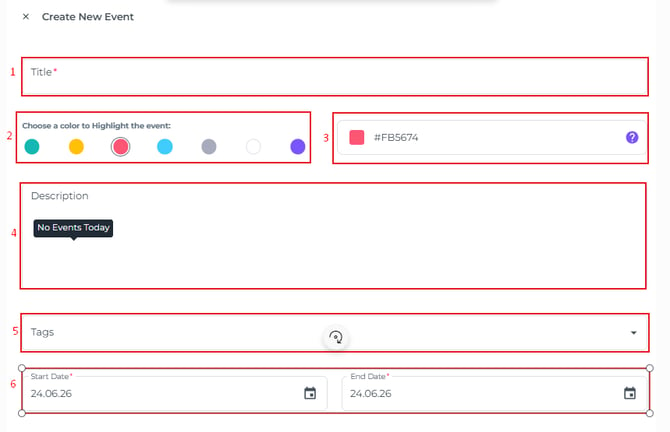
- Click + Create New Event, which will open a pop-up:
-
Event Name - Mandatory - Give a clear concise name of the event
- Colour Picker - Assign your event a preset colour that matches your internal standards for special occasions.
For example: concerts – yellow, national holidays – blue, trade fairs – red. This helps users immediately recognise what type of event applies to each date - Custom Colour - Use this option if you want to define your own colour for the event type
- Description - This can be a brief summary of the event or a detailed description outlining all planned actions
- Tags - Add a tag to distinguish specific types of events
- Dates - Mandatory - Select the start and end date of the event. For single-day events, both dates will be the same (max length is 1 year)
- After all fields are correctly filled out, the event will be created and shown on the above mentioned calendars and reports.