☝️Please Note:
Noovy RMS should always be configured together with a Noovy Customer Success Specialist and/or Noovy Revenue Manager.
Although the RMS can be set up within minutes, it is essential to configure it correctly, continuously monitor the results, and make adjustments where necessary to achieve the best possible performance and revenue outcomes.
-
The recommended rate can be applied:
-
Manually - We advise hoteliers to first apply recommendations manually and monitor the results.
-
Automatically - Once comfortable, auto-apply can be enabled. When auto-apply is active, rates can still be set manually for specific dates by locking the rate. Locked rates will not be overwritten.
-
Sidenote - Always have full control over your rate updates :
When Noovy RMS Automatic Rate Update is enabled, you can always disable it for specific periods:
Tick off the box 'Block Rate from Affection & Auto Update'
in the Bulk feature of the Rate Calendar: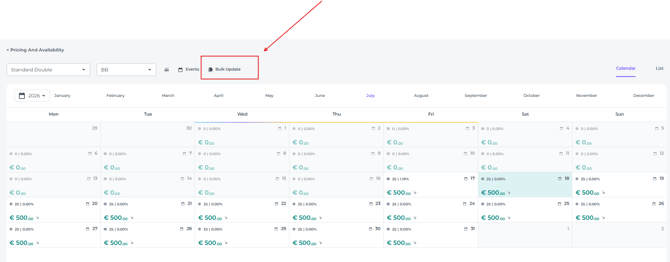
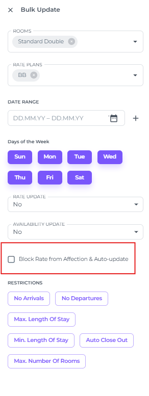
By selecting the checkbox and switching on the toggle, automatic rate updates are disabled for the selected period and rates in the Bulk Update. 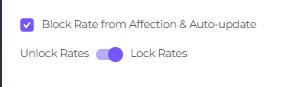
1. Competitors
During your onboarding your account manager will ask you to provide 6 competitors. The compset will be processed by Lighthouse/OTA Insight.
The first step is selecting six competitors. Choosing the right competitors is extremely important and should be done carefully, taking the following points into consideration:
-
Your ideal pricing position should generally be around the middle of these competitors on a “normal” day.
-
The selected competitors should have availability on most days during the next 12 months.
-
The competitors should make limited use of minimum length-of-stay restrictions.
-
The competitors should offer refundable rates on Booking.com.
-
The competitors should actively and professionally manage their pricing.
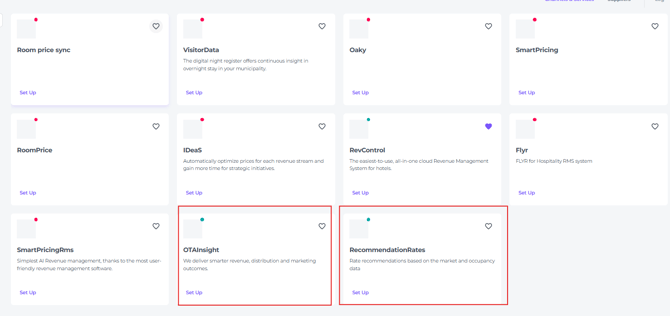
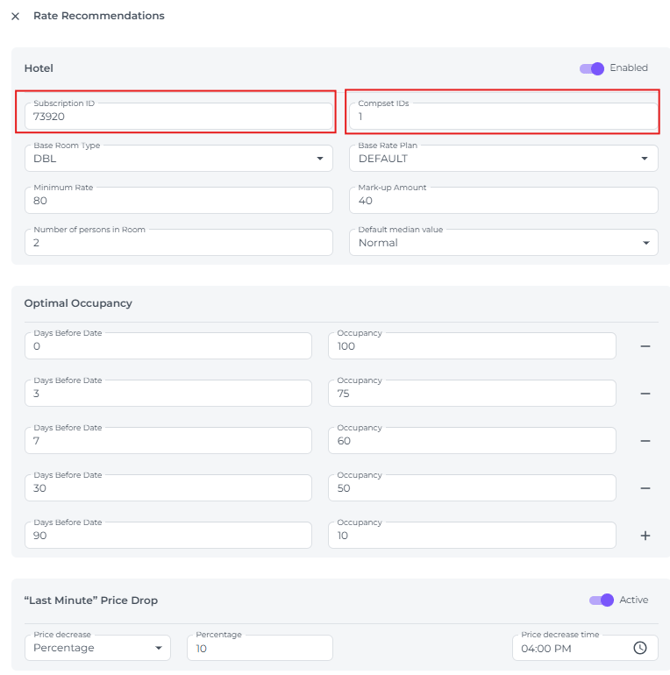
The competitor subscription ID and compset ID (Which is processed by Lighthouse/OTA Insight) must be completed in the Noovy Marketplace in OTA Insight (Lighthouse) and in Noovy RMS (Recommendation Rates).
2. General Information
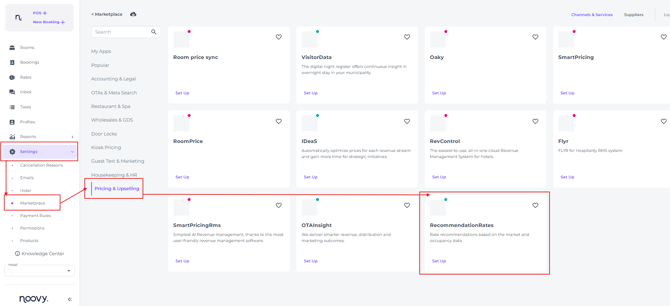
Start setting up in the Hotel section of the Recommendation Rates in Marketplace
-
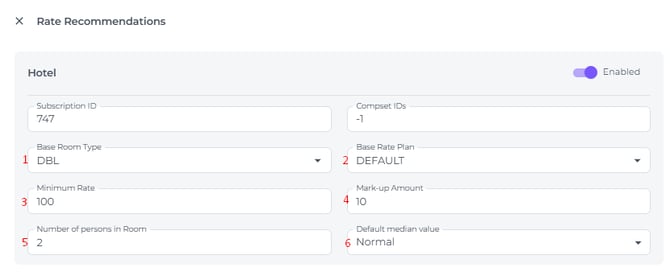
The following RMS settings must be completed:
-
Base Room Type
This is the room type that will be updated by the RMS. All other room types are expected to be affected by this room type.
-
Base Rate Plan
This is the rate plan that will be updated. Other rate plans are are expected to be affected by this rate plan.
-
Minimum Rate
This is the lowest rate that can be offered. Noovy RMS will never recommend a rate below this value.
-
Mark-Up Amount
-
This is a fixed adjustment applied to the recommended rate in case you believe the recommendations are consistently too low or too high.
For example, setting a mark-up of €10 will increase all recommended rates by €10.
-
If the base room type is already the lowest room type for the configured number of persons, we recommend keeping the mark-up at €0.
-
If the base room type is not the lowest room type, we recommend setting the mark-up equal to the price difference between the lowest room type for that occupancy and the selected base room type.
-
-
-
Number of Persons in Room
This refers to the occupancy of the base room type, which is typically 2 persons for a double room.
-
Default Median Value
-
This determines the default market positioning of your hotel compared to competitors. We generally recommend setting this to Normal.
-
The positioning can also be adjusted per day from the Rate Calendar:
-
-
-
-
High positioning places your pricing toward the top of the competitor set and focuses more on ADR.
-
Low positioning places your pricing toward the lower end of the competitor set and focuses more on occupancy.
-
-
3. Optimal Occupancy
Noovy RMS continuously compares your actual occupancy with your optimal occupancy.
Example of how Optimal Occupancy is configured for a specific hotel:
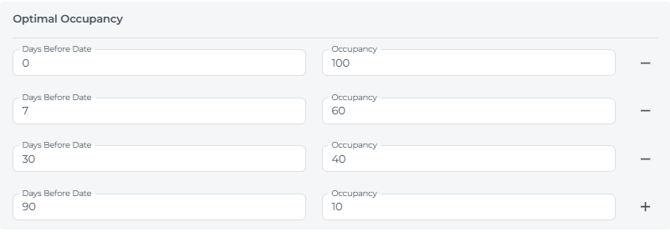
Optimal occupancy represents the ideal and realistic booking pace target. Based on this comparison, the system determines whether performance for a specific day is below target, on target, or above target.
-
A higher optimal occupancy target will cause Noovy RMS to lower rates quicker in order to attract bookings.
-
A lower optimal occupancy target will cause Noovy RMS to increase rates quicker to maximize ADR.
By default, the optimal occupancy is configured as follows:
-
0 days before arrival: 90% occupancy
-
30 days before arrival: 60% occupancy
-
60 days before arrival: 30% occupancy
-
90 days before arrival: 10% occupancy
These default settings are a good starting point, but booking pace and strategy can vary significantly between hotels.
The optimal occupancy settings can be adjusted at any time, including adding or removing time frames. Any changes will immediately affect the recommended rates.
Spreadsheet
You can compare your hotel’s actual occupancy against the optimal occupancy using the provided spreadsheet. The spreadsheet is currently configured for the following lead times: 0, 7, 14, 30, 60 and 90 days before arrival.
Simply update the highlighted fields, for the actual availability use the Availability Report in Noovy (download coming 2-6 months). The graph will display the difference between actual occupancy and optimal occupancy.
4. Last-Minute Price Drop
Hotels can optionally enable a last-minute price drop feature.
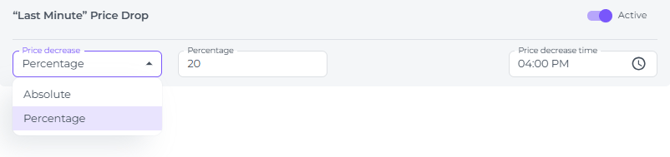
This feature automatically lowers the rate for the same day at a configured time and discount level. The objective is to maximize occupancy and revenue by stimulating last-minute same-day bookings and reducing the number of unsold rooms.
5. Monitoring
Once Noovy RMS has been fully configured, the recommended rates will become visible in the Rate Calendar.
Statistics per day: 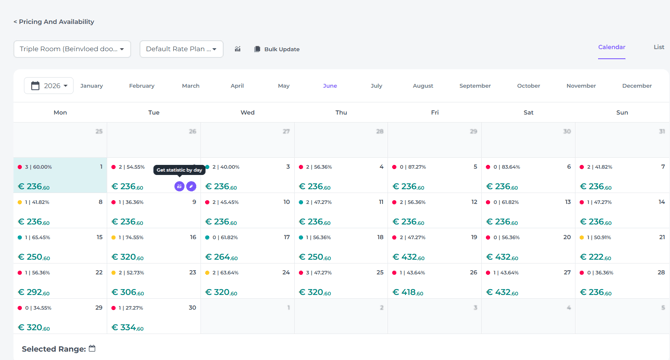
Statistics per month: 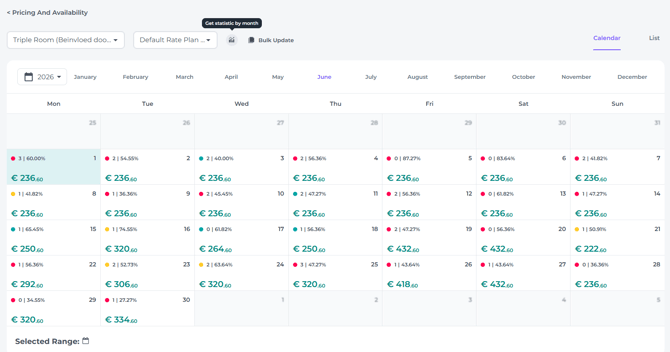
💡Tip:
Check also our article: Noovy RMS
It is important to continuously monitor the recommendations to ensure the pricing strategy aligns with your expectations and commercial goals. Adjustments can always be made where necessary to further optimize performance.