ℹ️ Why cancelling a credit card authorisation manually benefits the hotel.
Credit card authorizations are released automatically after a predetermined period—usually within 30 days—though this timeframe can differ depending on the guest’s card issuer or bank. Guests may find this frustrating, which can negatively impact their overall guest experience.
If you manually cancel an authorization in the system, the payment processor (Stripe) removes the hold immediately. However, it generally takes 7 to 10 business days for the funds to become available again on the guest’s bank statement. Once you have cancelled the authorisation, you can assure your guest that the process is complete on your end and recommend they contact their bank for specific information about the release. This demonstrates consideration for your guest's needs and provides a more personalised experience.
ℹ️STRIPE
☝️Please note:
Processing credit card transactions in the system will only be possible if you are using Stripe, the online payment processing platform used by Noovy.
Locate the concerning authorisation
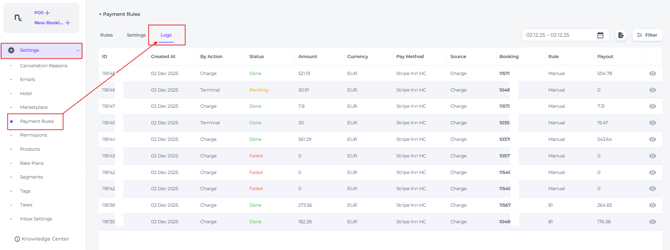
- On the main menu go to Settings - Payment Rules and choose the Payment Logs tab:
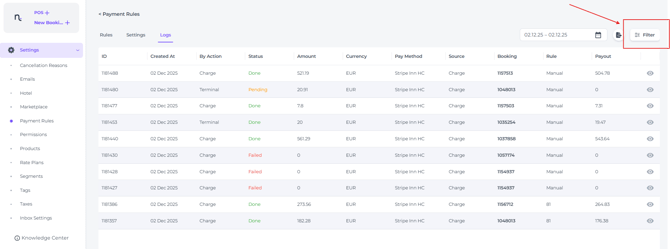
- To isolate the concerning authorisation, use the log's Filter and its search functions:
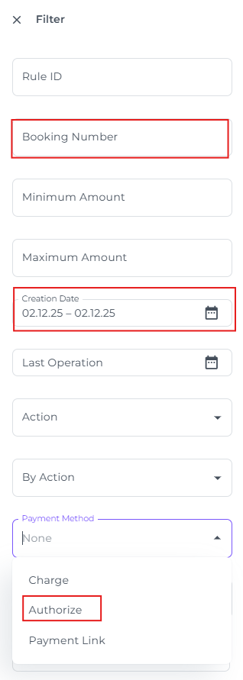
- The quickest way to find the relevant authorisation is to enter the Booking Number, Creation Date, and set Payment Method to Authorisation:
Cancel the authorisation
The blocked funds will be manually cancelled by your system.
Once the authorisation is found, you can choose to finalise the charge or release the funds back to the cardholder.
- Click on the Eye Symbol for the detailed view to see more information on the transaction:

You will see the transaction details, including the unique Charge ID issued by Stripe, and the exact date and time the authorisation was created. - To cancel and release the authorisation amount, click on Cancel:

- Stripe (your online payment processing platform) will process the release immediately, and you have done your diligent part.
*Please be aware that the guest will typically see the released amount reflected on their bank statement within 7–10 business days. If it takes longer, advise the guest to contact their bank for further assistance.
ℹ️ Credit card Authorisations from start to finish:
The Authorisation
Many hotels place an authorisation hold on the guest’s credit card at check-in to cover potential incidental charges and ensure payments are collected smoothly. When there is no action afterwards, the authorised amount on a credit card will automatically be released within 30 days.
👉 See article 'How to Authorise a Credit Card?'
Cancel an Authorisation
You can cancel the authorisation after departure, which will release the amount sooner back to the guest's bank account (7 - 10 days) . A specific timeline when the amount will be back on the account depends on the efficiency of their bank. Please advise the guest to contact their bank if the delay is longer than that.
Capture an Authorisation
Another option is to 'capture' the authorisation at check out, if the guest agrees. This means that the authorisation is converted into an actual payment. Any left to pay charges that remains afterwards can be settled by the guest using their preferred payment method.
*By choosing to capture the authorisation at check-out, you streamline the payment process and prevent delays in returning funds to the guest’s account—helping to ensure a positive experience. ☝️Mind you: It’s essential to confirm the guest’s consent before proceeding, which can be documented with a signature on the printed invoice to provide clear authorisation for the charges. If a dispute is raised after check-out, this documentation will serve as important evidence.
👉 Check out the article: 'How to capture a Credit Card Authorisation'